Fix 'You Do Not Have Permission to Use This Command' Error in Hytale
Fix 'You Do Not Have Permission to Use This Command' Error in Hytale
Getting a permission error when trying to use Creative Tools? Here’s how to fix it.
The Problem
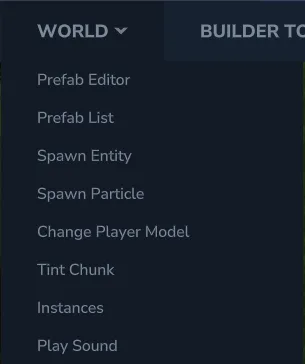
Section titled “The Problem”When clicking buttons in the World menu of Creative Tools - such as Spawn Entity, Prefab Editor, Spawn Particle, Change Player Model, or other commands - you may encounter permission errors.
Clicking any of these tools displays the error:

The Asset Editor shows a similar error:

These errors prevent you from using Creative Tools features that require commands.
The Fix
Section titled “The Fix”Open the chat (press Enter) and type:
/op selfPress Enter to execute the command. You’ll see a confirmation message:
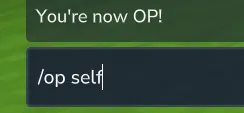
Now try using Creative Tools again - Spawn Entity, Prefab Editor, Asset Editor, and all other tools should work.
Why This Happens
Section titled “Why This Happens”Creative Tools buttons execute commands behind the scenes. These commands require operator (admin) permissions to run, which aren’t granted by default - even in single-player worlds.
The /op self command gives your player operator status, allowing you to:
- Use all Creative Tools commands (Spawn Entity, Prefab Editor, etc.)
- Access the Asset Editor
- Teleport around the world
- Access other admin-level features
This setting persists for your current session. You may need to run it again if you restart Hytale.
Affected Tools
Section titled “Affected Tools”The following Creative Tools require operator permissions:
- Prefab Editor - Create and edit prefabs
- Prefab List - Browse and place prefabs
- Spawn Entity - Spawn mobs and NPCs
- Spawn Particle - Create particle effects
- Change Player Model - Switch character models
- Tint Chunk - Modify chunk coloring
- Instances - Manage world instances
- Play Sound - Trigger sound effects
- Asset Editor - Edit game assets